MediSpa booking
How a treatment booking travels from the calendar through Sesami, Klaviyo and Zapier into the Shopify cart.
MediSpa booking
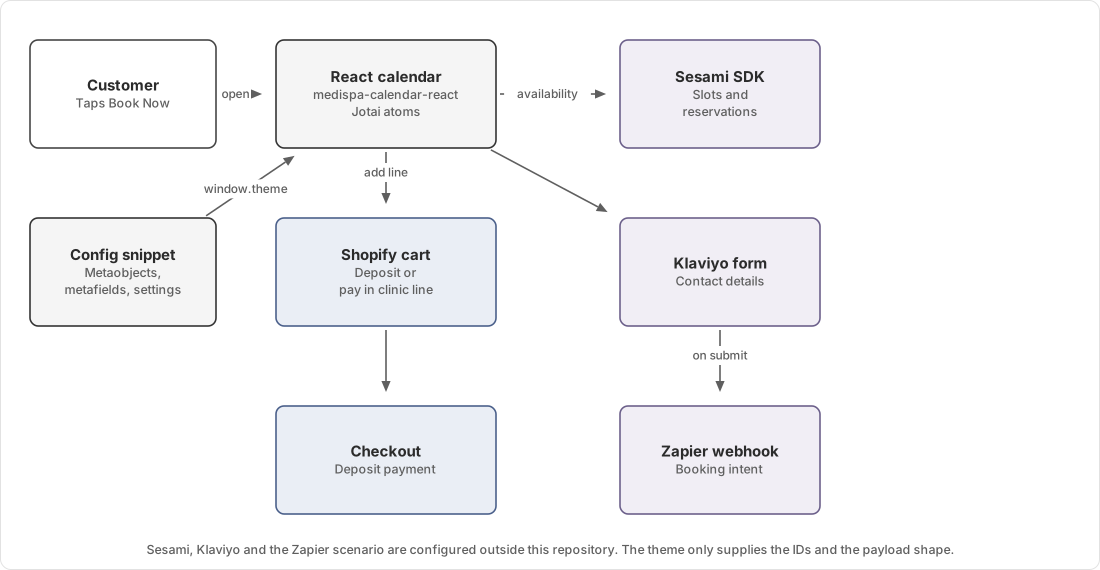
The booking calendar is the only React in this theme. It mounts into a Liquid placeholder, reads its whole configuration from a global, and coordinates three external services.
Ownership
| Concern | Owner |
|---|---|
| Clinic details | Shopify medispa_locations metaobject |
| Treatment prices, deposits, pay-in-clinic amounts | Shopify product and product metafields |
| Which treatments a page offers | The Services Overview section's blocks |
| Labels, deposit defaults, timezone | Theme settings |
| Real appointment availability and reservations | Sesami |
| Contact capture form | Klaviyo |
| What happens after submission | Zapier |
| Payment | Shopify checkout |
Configuration handover
Liquid gathers everything the calendar needs and writes it to window.theme.medispaCalendarConfig.
snippets/medispa-calendar-config.liquid does that work, pulling from metaobjects, product metafields, page metafields
and theme settings in one pass.
React never queries Shopify for this. The calendar reads the global once at mount, through a Jotai atom seeded from
window.theme.medispaCalendarConfig.
A page can hold more than one treatment list, so the config can change after mount. The calendar listens for a
theme:medispaCalendarConfig event on document and re-reads the config when a Book Now button in a different Services
Overview section dispatches it.
All prices in the config snippet arrive in dollars, from the render parameters, the landing page's offer_price
metafield and the theme settings. Shopify's money filters expect cents, so the conversion happens exactly once at the
formatting boundary. Keep that property if you touch the snippet, because a second conversion produces a price a hundred
times too large and it is not obvious in review.
Mount sequence
- A MediSpa layout renders
snippets/medispa-calendar-config.liquidandsnippets/medispa-calendar-placeholder.liquid. src/entrypoints/medispa-calendar-react.tsxwaits forwindow.SesamiSDKusing thedeferJShelper, which polls every 50 milliseconds.- Once the SDK exists, React mounts
CalendarRootinto.medispa-calendar--placeholder. src/entrypoints/medispa-booking-actions.tsbinds every.js-action[data-action="open-calendar"]button, finds the nearest treatment list, and opens the calendar with that list.
The polling wait exists because Sesami's SDK arrives as its own script tag and the theme cannot control when. If it never arrives, the calendar never mounts and the placeholder stays empty.
Booking sequence
When a customer confirms a slot:
- The calendar revalidates the slot, because someone else may have taken it while the customer waited on the confirmation step.
- It calls
sesami.reserve(slot)and receives a reservation token with an expiry. - It looks up the treatment's Downpay selling plan by fetching the product's selling plan groups.
- It posts to
/cart/add.jswith the treatment variant and a set of line item properties. - The drawer opens with the booking line.
The line item properties carry the whole booking:
| Property | Contents |
|---|---|
Date, Time, Timezone | The chosen appointment |
_reservation_token | The Sesami reservation, which is what actually holds the slot |
_remaining-slots | Remaining availability at the time of booking |
_source | medispa-calendar:handleReserveSlot |
| The Remaining Amount label from theme settings | Balance owing after the deposit |
Shopify hides properties beginning with an underscore from the storefront and checkout, so customers never see the
reservation token or the source marker. Both stay visible in /cart.js, the order in Shopify Admin and webhooks.
A cart line without _reservation_token is a treatment purchase with no appointment attached.
Lead capture
Separately from the cart flow, submitting the Klaviyo booking form posts a payload to the Zapier webhook URL in theme settings.
src/@types/calendar.ts lists every payload key explicitly instead of passing form fields through, so the Zapier
receive node sees a stable shape. Adding a field to the Klaviyo form does not add it to the webhook. Both sides need
changing together, along with the type.
Deposits
A customer can book a treatment two ways, and product metafields control which options appear.
Paying a deposit now uses a Downpay selling plan. At add-to-cart time the calendar reads the product's selling plan
groups and looks for deposit_selling_plan. When that lookup fails, the calendar adds the line without a selling plan,
and checkout charges the full price rather than the deposit.
Paying in clinic adds the line with no selling plan and shows the full amount as owing at the clinic. Its availability
comes from custom.enable_pay_in_store on the product, which a page-level custom.pay_in_store metafield can override
for everything on that page.
custom.enable_checkout controls whether the deposit option appears at all. It is absent on older products, and the
calendar treats absent as enabled, so adding the metafield set to false is how you turn it off.
Trust boundaries
Availability is Sesami's. The calendar renders what the SDK returns and cannot verify it. An empty calendar is indistinguishable from a Sesami outage without checking Sesami directly.
The reservation is Sesami's. The theme holds a token and passes it to Shopify as a line item property. Nothing in this repository can extend, release or validate it.
Prices are Shopify's. The calendar's labels come from metafields and settings and are display only. Checkout recomputes from the product and selling plan.
Failure modes
| Symptom | Likely cause |
|---|---|
| Calendar never appears, placeholder stays empty | window.SesamiSDK never loaded. Check for a blocked script |
| Calendar opens with the wrong treatments | The Book Now button sits in a different Services Overview section |
| Every clinic shows no slots | Sesami outage, or the clinic has no availability configured there |
| Deposit charges the full price | The Downpay selling plan lookup failed for that product |
| Bookings stop reaching downstream systems | Zapier webhook URL changed on one side only |
| Prices a hundred times too large | A dollars value converted to cents twice |
Diagnosis steps are in Booking calendar will not open.
Source map
| Concern | File |
|---|---|
| Configuration assembly | snippets/medispa-calendar-config.liquid |
| Inline configuration variant | snippets/medispa-calendar-config-inline.liquid |
| Mount point | snippets/medispa-calendar-placeholder.liquid |
| React entry and SDK wait | src/entrypoints/medispa-calendar-react.tsx |
| Booking sequence and cart add | src/components/medispa-calendar/CalendarRoot.tsx |
| Confirmation step and CTA labels | src/components/medispa-calendar/CalendarConfirm.tsx |
| Shared state | src/components/medispa-calendar/calendar-atoms.ts |
| Sesami, Klaviyo and Zapier types | src/@types/calendar.ts |
| Book Now binding | src/entrypoints/medispa-booking-actions.ts |
| Treatment list section | sections/overview-services-grid.liquid |
| Balance owing recalculation | src/entrypoints/mini-cart/internals/line-item-rules/remaining-amount-recalculation-rule.ts |
Operator instructions are in MediSpa booking.