System overview
What this theme is made of, which system owns each behaviour, and where the boundaries sit.
System overview
Beauty Affairs AU is one Shopify theme in one repository. There is no separate app, no server and no database that this team runs. Everything either renders in Liquid, runs in the browser, or belongs to Shopify or an installed app.
Before any change, work out which of the four owners makes it.
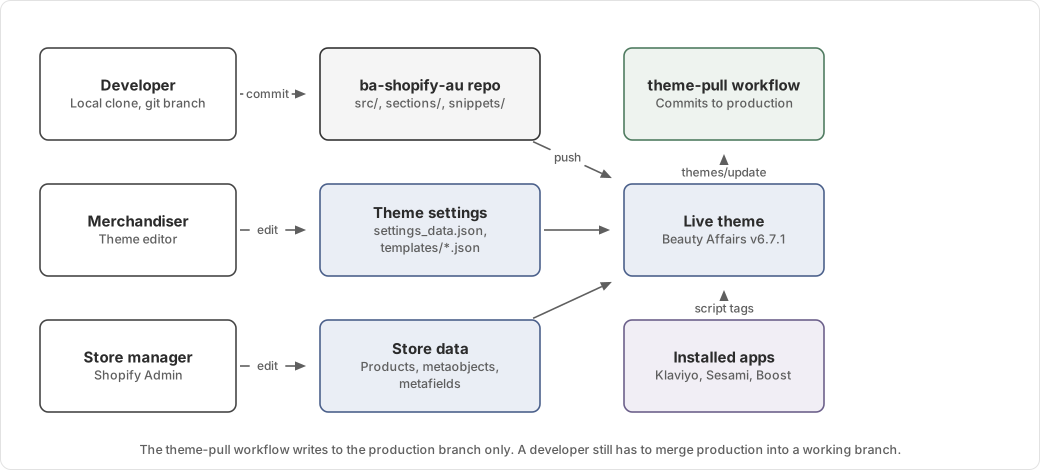
The two halves of the repository
The repository is a standard Shopify theme at the root, with a source project added in src/.
| Directory | Contents | Edited by |
|---|---|---|
layout/, templates/, sections/, snippets/, blocks/ | Liquid | Developer, plus the theme editor for JSON templates |
config/ | Theme settings schema and saved values | Developer for the schema, theme editor for the values |
locales/ | Translation strings | Developer |
assets/ | Build output, plus older hand-written files | Vite, mostly |
src/ | TypeScript, TSX and source CSS | Developer only |
scripts/ | Node scripts for onboarding, deploys and the dev tunnel | Developer only |
.shopifyignore keeps src/, scripts/, node_modules/ and the tooling config out of every theme push, so the store
never receives source files. Only the compiled output in assets/ is uploaded.
How source reaches the browser
Liquid cannot import a TypeScript module, so a generated snippet connects the two.
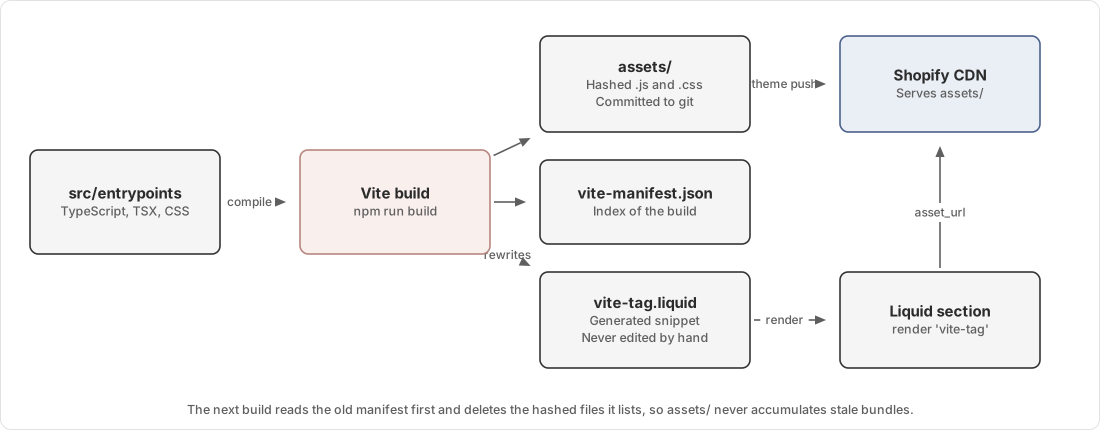
A section that needs behaviour renders one line:
{%- render 'vite-tag' with 'mini-cart/elements/mini-cart.ts' -%}snippets/vite-tag.liquid is a generated lookup table mapping every entrypoint path to its hashed output file. Vite
rewrites it on every build. Full detail is in How the build works.
Ownership of behaviour
| Behaviour | Owned by | Notes |
|---|---|---|
| Page structure and styling | This repository | Liquid plus compiled CSS |
| Cart drawer, reward progress, free gifts | This repository | Reads thresholds from theme settings and gifts from a metaobject |
| Booking calendar UI | This repository | React, mounted into a Liquid placeholder |
| Appointment availability | Sesami | The theme calls their SDK and renders what it returns |
| Email and SMS capture | Klaviyo | The theme holds form IDs and coordinates when a popup may open |
| Booking intent routing | Zapier | The theme posts a payload to a webhook URL held in theme settings |
| Search and collection filtering | Boost | Renders through its own snippets |
| Discount display and promotions | Discount Ninja | Injects its own scripts |
| Analytics | Google Tag Manager | Container ID in theme settings |
Anything in the right column outside this repository can change without a commit here. That is the main reason a behaviour can differ between environments with no code difference.
Trust boundaries
The browser is not trusted. Shopify recomputes every price, discount and gift the theme shows when the customer reaches checkout. Theme code that appears to control a price controls only how the price is displayed.
Third-party scripts share the page. The theme uses Yett to hold back specific vendor scripts until the theme releases
them, with the blocklist set in layout/theme.liquid. MediSpa landing pages use a stricter list in
layout/theme.redirect.liquid, because the team has no admin access to some apps' own page-targeting settings.
The cart is shared state. Several apps write to the Shopify Ajax Cart, and none of them notify the theme. The mini-cart
patches window.fetch to observe those writes. See Mini-cart.
Failure modes
A stale snippets/vite-tag.liquid points Liquid at a hashed file that no longer exists in assets/, so the browser
gets a 404 and the feature does nothing. Rebuilding fixes it. See
Feature does nothing and the console shows a 404.
A push from a stale branch overwrites any theme editor change made after the last pull. The Pull theme from Shopify
workflow exists to prevent this, and it only writes to production. See
Branches and theme sync.
When an app stops responding, its feature stops working. A Sesami outage produces a calendar with no slots, which looks identical to a clinic with no availability.
Where to go next
| You want | Page |
|---|---|
| The build in detail | How the build works |
| Which layout a page uses | Layouts and templates |
| How the cart stays consistent | Mini-cart |
| How a booking is made | MediSpa booking |
| What each installed app does | Integrations |