How the build works
How TypeScript and CSS in src become hashed assets that Liquid can load, and why vite-tag.liquid is generated.
How the build works
Liquid has no module system, and Shopify's assets/ directory is flat. Vite works around both by compiling src/ into
hashed files in assets/ and generating the Liquid snippet that points at them.
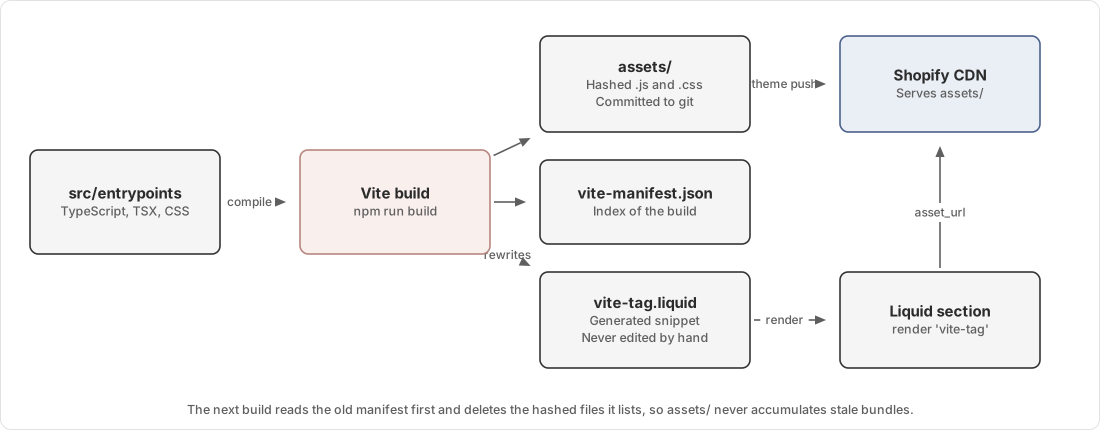
The pieces
| File | Role |
|---|---|
src/entrypoints/** | Every file here becomes a separately loadable bundle |
vite.config.js | Vite configuration, including the Shopify plugin and a cleanup plugin |
assets/*-XXXXXXXX.js and .css | Compiled output, committed to git |
assets/vite-manifest.json | Index of the build, written by Vite |
snippets/vite-tag.liquid | Generated lookup table from entrypoint path to hashed file |
src/entrypoints/theme.styles.css | Tailwind output, produced by PostCSS before Vite runs |
Only files directly under src/entrypoints/ and its subdirectories become entrypoints. Entrypoints import files from
src/components/, src/lib/ and src/@types/, and those files never load on their own.
What npm run build does
npm run buildIt runs two steps in order.
First npm run build:css runs PostCSS over src/assets/theme_in.css, which is three Tailwind directives, and writes
the result to src/entrypoints/theme.styles.css. Tailwind scans ./**/*.liquid and ./src/**/*.{js,ts,jsx,tsx} for
class names, so a class used only in Liquid is still generated.
Then vite build compiles every entrypoint. Before it starts, a cleanup plugin reads the previous
assets/vite-manifest.json and deletes each hashed file it lists, so assets/ never accumulates old bundles. After the
bundle is written, the same plugin sweeps assets/ again for orphaned files whose name matches a current output's hash
pattern.
vite-plugin-shopify writes the manifest and rewrites snippets/vite-tag.liquid.
How Liquid loads a bundle
A Liquid file asks for an entrypoint by its path relative to src/entrypoints/:
{%- render 'vite-tag' with 'mini-cart/elements/mini-cart.ts' -%}
{%- render 'vite-tag' with 'mini-cart/elements/mini-cart.css' -%}
vite-tag.liquid is a long chain of elsif branches. Each one matches an entrypoint path and emits the right tag, plus
modulepreload links for that bundle's shared chunks:
{% elsif path == '/src/entrypoints/cart-reward-banner.ts' or path == 'cart-reward-banner.ts' %}
  <script src='{{ 'cart-reward-banner-Cd_n0SIT.js' | asset_url }}' type='module' crossorigin='anonymous'></script>
  <link rel='modulepreload' href='{{ 'core-D-K-kGrY.js' | asset_url }}' crossorigin='anonymous'>
asset_url turns the filename into a Shopify CDN URL. The browser never sees the repository path.
Never edit snippets/vite-tag.liquid. The next build overwrites it, and your change is lost with no error.
Loading a bundle only where it is used
Most sections render vite-tag themselves rather than relying on the layout. A carousel section loads its own bundle,
so a page without that carousel does not download it.
layout/theme.liquid loads only what every page needs: the Tailwind output, the theme stylesheet, the menu styles, and
a few global behaviours.
Adding a section to a page adds its JavaScript to that page. That is intended. It is also why a bundle can work on the homepage and appear broken on a landing page that never rendered the section that loads it.
Development mode
npm run dev starts four processes under run-pty, defined in run-pty.json.
| Process | What it does |
|---|---|
| vite | Vite dev server on https://localhost:5173 with HTTPS and CORS |
| css | PostCSS in watch mode, rebuilding the Tailwind output |
| shopify | shopify theme dev on http://127.0.0.1:9292 |
| tunnel | A Cloudflare quick tunnel giving the Shopify preview an HTTPS URL |
In development vite-plugin-shopify rewrites vite-tag.liquid to point at the Vite dev server instead of assets/, so
hot module replacement works. This is why snippets/vite-tag.liquid shows up as modified in git status while the dev
server runs. Run npm run build before committing to restore the production form.
The tunnel rewrites its origin Host header to 127.0.0.1:9292, because Shopify's local proxy rejects the public
trycloudflare.com hostname with a JSON 400.
Why assets are committed
The build output is committed to git rather than generated during deployment.
A developer who pulls only the theme from Shopify still gets working, readable code, because the build does not minify JavaScript or CSS and source maps embed the original source. Someone who inherits this store without the repository can still read what is running.
The cost is that every build produces a diff in assets/. A pull request touching one entrypoint will show changes to
several hashed files, and that is normal.
A pre-commit hook runs npm run build on every commit, so the committed output stays in step with src/. It is
configured under simple-git-hooks in package.json.
Failure modes
| Symptom | Cause |
|---|---|
| Feature does nothing, console shows a 404 for a hashed asset | vite-tag.liquid was committed while it pointed at the dev server, or the build output was not committed |
A change to src/ has no effect on the storefront | The build was not run, or was run but not pushed |
A hand edit to assets/ reverts | The build overwrote it. Change the source in src/ instead |
| Tailwind class missing in production | The class is built dynamically, so Tailwind never saw the string. Add it to safelist in tailwind.config.cjs |
Diagnosis steps are in Feature does nothing and the console shows a 404.
Source map
| Concern | File |
|---|---|
| Vite configuration and asset cleanup | vite.config.js |
| Entrypoints | src/entrypoints/ |
| Tailwind configuration | tailwind.config.cjs |
| PostCSS pipeline | postcss.config.cjs |
| Tailwind entry file | src/assets/theme_in.css |
| TypeScript configuration and path aliases | tsconfig.json |
| Dev process definitions | run-pty.json |
| Tunnel startup | scripts/start-cloudflare-tunnel.mjs |
| Files excluded from theme pushes | .shopifyignore |