Mini-cart
How the cart drawer stays consistent when several apps write to the same Shopify cart.
Mini-cart
The cart drawer is a set of custom elements around one event bus. Several installed apps write to the Shopify cart without telling the theme. A drawer that redraws only after its own actions would show out-of-date contents, so this one also listens for cart writes it did not make.
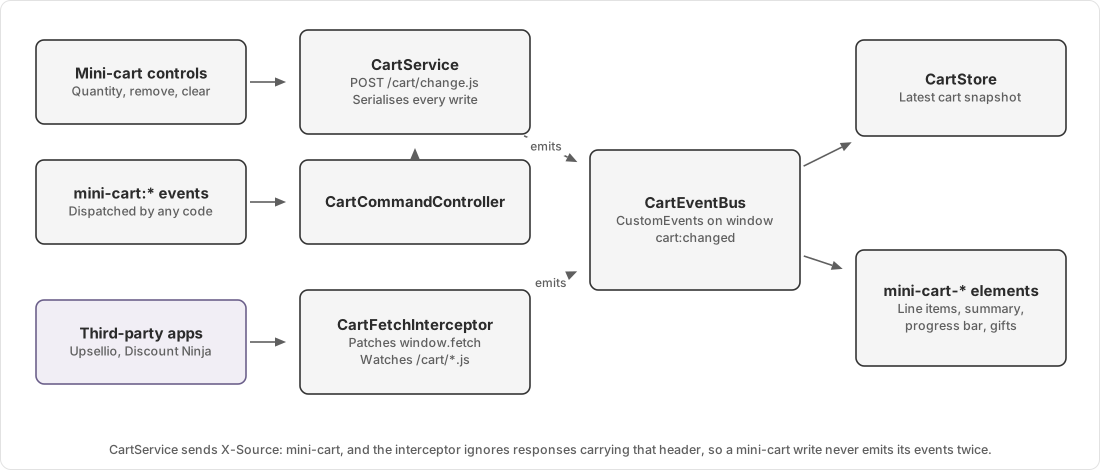
Ownership
| Concern | Owner |
|---|---|
| Cart contents and prices | Shopify |
| Drawer markup and blocks | sections/mini-cart.liquid and its snippets |
| Network calls and event emission | CartService |
| Observing other people's writes | CartFetchInterceptor |
| Latest known cart | CartStore |
| Rendering | The mini-cart-* custom elements |
The theme never treats its own copy of the cart as authoritative. Every mutation returns a fresh cart from Shopify, and the theme broadcasts that response.
The pieces
| Module | Role |
|---|---|
internals/core.ts | Cart and line types, and the CartEvents name constants |
internals/event-bus.ts | Thin wrapper over CustomEvent on window |
internals/cart-service.ts | Calls the Shopify Ajax Cart API and emits lifecycle events |
internals/simple-cart-service.ts | Friendlier API over CartService, plus stale-key recovery |
internals/fetch-interceptor.ts | Patches window.fetch to observe cart writes from anywhere |
internals/command-controller.ts | Turns mini-cart:* window events into service calls |
internals/cart-store.ts | Holds the latest cart, updated from success events |
elements/mini-cart.ts | The root custom element that wires the rest together |
elements/mini-cart-*.ts | One element per drawer block |
The bus is plain CustomEvent on window, so any script on the page can listen or dispatch without importing anything.
This is deliberate, because it lets a Liquid snippet or an app trigger cart behaviour.
Event flow
A mutation goes through four stages. An add runs like this.
cart:add:startfires with the payload.CartServiceposts to/cart/add.js.- On success,
cart:add:successfires with the payload and the resulting cart. cart:changedfires with the cart and a reason ofadd.
cart:changed is the event most code should listen to. It fires for every kind of change and carries the authoritative
cart.
The root element also emits cart:changed:debounced 250 milliseconds after the last change. Elements that re-render
expensively, including the progress bar, listen to that instead so a rapid sequence of quantity clicks produces one
render.
The full list of names is in Cart events.
Why fetch is patched
Third-party apps post to /cart/add.js and /cart/change.js directly. Without interception the drawer would show a
total that no longer matches the cart.
CartFetchInterceptor replaces window.fetch, matches URLs against /cart(.js|/*.js), and emits the same success and
change events for a write it did not make.
When the mini-cart makes the call itself, the interceptor would fire every event a second time. A header prevents this.
CartService sends X-Source: mini-cart on all its requests, and the interceptor skips any response carrying it.
/cart/add.js does not return the cart, so after an add the interceptor issues its own GET /cart.js and broadcasts
that result instead.
Why writes are serialised
Shopify derives a line item key from a hash of the line's properties. Writing a property creates a new key for the same line.
That makes read-modify-write racy. A concurrent write can invalidate the key between a GET /cart.js and the
POST /cart/change.js that follows it, and Shopify answers with 400 no valid id or line parameter.
CartService.runExclusive holds a promise chain so mutations run one at a time. Every task queues behind the previous
one, including failed ones, so a rejection does not stall the queue.
A task inside runExclusive must call only the low-level methods on CartService. Calling a SimpleCartService method
re-enters the queue and deadlocks. This is the easiest way to break the cart. Check for it whenever you add cart code.
Stale key recovery
Even with serialisation, DOM rendered before a property write holds an old key.
resolveLineItem in simple-cart-service.ts recovers by matching on the variant id, which is the stable half of the
key. It only recovers when exactly one line matches. Two lines of the same variant, such as a purchased item plus its
free gift, are ambiguous, so it gives up and the caller re-renders from the authoritative cart rather than guessing.
Line item property rules
Some cart lines carry properties the theme maintains, such as a promotion label or the balance owing on a MediSpa
deposit. A chain of rules in internals/line-item-rules/ keeps them correct.
| Rule | What it maintains |
|---|---|
promotion-messaging-rule | Adds a promotion label when a line meets the gift manager's price and quantity requirements |
promotion-label-quantity-rule | Removes that label when the line drops below three units |
remaining-amount-recalculation-rule | Recalculates the balance owing on MediSpa lines |
Each rule proposes property changes rather than writing them, and the chain applies the merged result in one pass. That keeps the number of key-changing writes to a minimum, which matters because every one of them invalidates a key.
Cart source tagging
Every add carries a _source line item property recording where it came from, in the form surface:function, for
example quick-add-modal:addToCart.
Shopify hides properties whose name starts with an underscore from the storefront and checkout, so customers never see
it. It stays visible in /cart.js, the order in Shopify Admin and webhooks, so you can check there which code added a
line.
withCartSource in src/lib/cart-source.ts keeps an existing _source rather than overwriting it, so a more specific
tag set earlier by the caller survives.
Failure modes
| Symptom | Likely cause |
|---|---|
| Drawer total disagrees with the cart page | An event was missed. Check whether the writing code sets X-Source |
400 no valid id or line parameter | Stale line item key, usually a write that bypassed runExclusive |
| Every cart event fires twice | Something copied the X-Source header, or a second interceptor was installed |
| Cart hangs after one action | A task inside runExclusive called SimpleCartService and deadlocked the queue |
| Progress bar does not move | It listens to the debounced event. Confirm cart:changed fired at all |
Diagnosis steps are in Cart total or gift is wrong.
Source map
| Concern | File |
|---|---|
| Event names and cart types | src/entrypoints/mini-cart/internals/core.ts |
| Network calls and serialisation | src/entrypoints/mini-cart/internals/cart-service.ts |
| Stale key recovery | src/entrypoints/mini-cart/internals/simple-cart-service.ts |
| Fetch patching | src/entrypoints/mini-cart/internals/fetch-interceptor.ts |
| Command events | src/entrypoints/mini-cart/internals/command-controller.ts |
| Property rules | src/entrypoints/mini-cart/internals/line-item-rules/ |
| Checkout interception | src/entrypoints/mini-cart/internals/checkout-chain.ts |
| Free gift logic | src/entrypoints/mini-cart/components/free-gifts.ts |
| Drawer section and blocks | sections/mini-cart.liquid |
| Cart source property | src/lib/cart-source.ts |
Operator instructions are in Cart rewards and free gifts.