Beauty Affairs AU theme documentation
How the Beauty Affairs Australia Shopify theme is built, operated and changed safely.
Beauty Affairs AU theme documentation
This is the storefront theme for Beauty Affairs Australia. It is a Shopify theme with an added TypeScript and React
source layer. Liquid renders the page, and Vite compiles everything under src/ into browser bundles that Liquid loads.
The store handle is a-sales-affair, not beauty-affairs. Every Shopify CLI command in these docs targets that store
through shopify.theme.toml.
Pick your path
If you change content, settings or merchandising, start in Operations. Those pages tell you which screen owns each value and how to check the change landed.
If you change code, start in the Developer guide. It covers the build, the local dev stack, and where each feature lives.
If something is broken right now, go to Runbooks.
If you need to look up an exact field name, event name or script, go to Reference.
Edit the source, not the build output
assets/ holds build output and it is committed to git. Vite compiles src/ into hashed files such as
assets/mini-cart-B1x9dQ2f.js, then rewrites snippets/vite-tag.liquid to point at them. Editing a file in assets/
or in snippets/vite-tag.liquid works until the next npm run build, which overwrites both.
Change the source in src/, run the build, and commit the result.
Read How the build works before your first change.
Who owns what
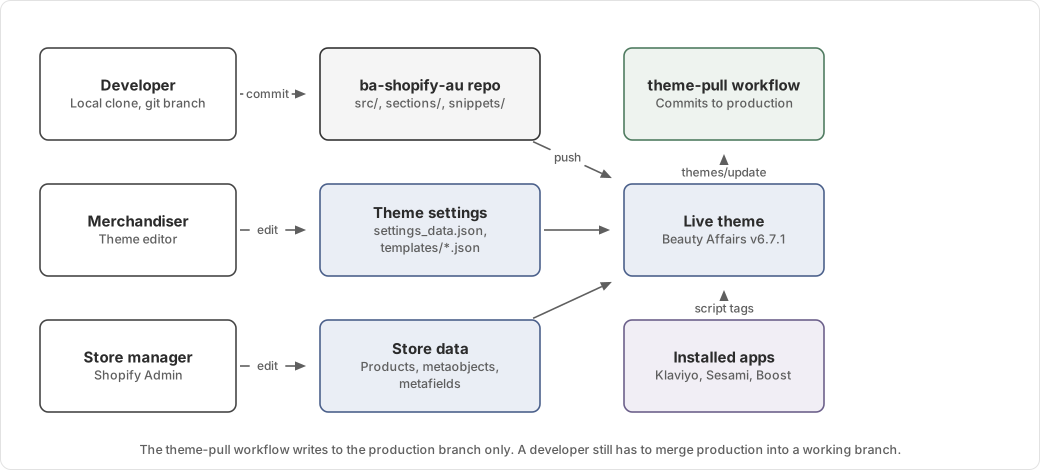
| Change | Owner | Where it happens |
|---|---|---|
| Section layout, copy, images | Merchandiser | Shopify theme editor |
| Reward tier thresholds, popup config, MediSpa deposit | Merchandiser | Theme editor, Theme settings |
| Products, collections, prices | Store manager | Shopify Admin |
| Clinic details, treatment metafields | Store manager | Shopify Admin, metaobjects and metafields |
| Markup, styling, behaviour | Developer | This repository |
| Email capture, booking availability, search and filtering | App administrator | Klaviyo, Sesami, Boost |
Full detail is in Responsibilities and ownership.
Production status
The theme is live and trading. Two facts change how you work on it.
The Shopify theme editor writes directly to the live theme. A GitHub Action named Pull theme from Shopify copies those
edits back into the production branch. It does not merge them into main. Merge production into your working branch
before you push, or you will overwrite a merchandiser's edit. See
Branches and theme sync.
The theme carries a large amount of older code from previous agencies and from apps that are no longer used.
sections/, snippets/ and templates/ contain files that nothing renders. Check
Legacy and unused code before you assume a file is live.
Documentation layout
| Section | Answers |
|---|---|
| Operations | Where do I go to change this, and how do I verify it? |
| Architecture | Why does it work this way, and who owns it? |
| Developer guide | Which files do I edit, and what must change with them? |
| Runbooks | It is broken. What do I check first? |
| Reference | What is the exact name of this field, event or script? |
Keeping these docs true
These pages describe the theme as it stands on the main branch. When you change something they describe, update the
page in the same pull request.
Diagrams come from one generator. Edit doc-site/content/diagrams/generate.mjs and run
node doc-site/content/diagrams/generate.mjs to rewrite both the SVG and the Excalidraw source. Do not edit either
output by hand.